affectOU provides tools for modeling affect dynamics
using the Ornstein-Uhlenbeck (OU) process – a continuous-time stochastic
model that captures how emotions fluctuate around a baseline and return
to equilibrium over time.
This vignette walks through the package’s core functionality: simulating the OU process, computing theoretical quantities, and fitting the unidimensional OU to data. See the vignette Affect characteristics implied by the OU process for visual demonstrations of the model’s qualitative behaviours and their psychological interpretations.
Creating a Model
One-Dimensional Model
For a univariate affective process, the stochastic differential equation of the OU is:
\[d{X}(t) = {\theta}({\mu} - {X}(t))dt + {\gamma} \, d{W}(t)\]
Here, the parameters represent:
-
\(\mu\) (
mu): Attractor location, or the baseline and “set point” of affect; -
\(\theta\) (
theta): Attractor strength, or how quickly affect returns to the baseline; -
\(\gamma\) (
gamma): Diffusion coefficient, or the scale of the random perturbations.
The diffusion coefficient \(\gamma\)
is more easily interpreted in terms of the noise variance \(\sigma\) (sigma), where \(\sigma = \gamma^2\).
You can create a simple one-dimensional model with default parameters
by calling the affectOU constructor:
model <- affectOU()
model
#>
#> ── 1D Ornstein-Uhlenbeck Model ─────────────────────────────────────────────────
#> dX(t) = θ(μ − X(t))dt + γ dW(t)
#>
#> θ = 0.500, μ = 0.000, γ = 1.000, σ = γ² = 1.000
Alternatively, you can specify custom parameters to represent, for example, a process with a stronger mean-reversion (\(\theta = 1\)), positive baseline (\(\mu = 1\)), and smaller amount of random perturbations (\(\sigma = 0.25\)):
model <- affectOU(theta = 1, mu = 1, sigma = 0.25)
model
#>
#> ── 1D Ornstein-Uhlenbeck Model ─────────────────────────────────────────────────
#> dX(t) = θ(μ − X(t))dt + γ dW(t)
#>
#> θ = 1.000, μ = 1.000, γ = 0.500, σ = γ² = 0.250
Multidimensional Models
The OU framework extends naturally to multiple affect dimensions (e.g., valence and arousal, positive and negative affect). For a d-dimensional process, the OU looks like:
\[d\mathbf{X}(t) = \mathbf{\Theta}(\mathbf{\mu} - \mathbf{X}(t))dt + \mathbf{\Gamma} \, d\mathbf{W}(t)\]
For multivariate models, the noise covariance matrix \(\Sigma\) is defined as \(\Sigma = \Gamma \Gamma^\top\).
By default, affectOU() creates a model with uncoupled
dynamics (diagonal \(\mathbf{\Theta}\)
and \(\mathbf{\Sigma}\)) and identical
parameters across dimensions. For example, for a two-dimensional model,
we get:
model_2d <- affectOU(ndim = 2)
model_2d
#>
#> ── 2D Ornstein-Uhlenbeck Model ─────────────────────────────────────────────────
#> dX(t) = Θ(μ − X(t))dt + Γ dW(t)
#>
#> μ = [0.000, 0.000]
#>
#> Θ:
#>      [,1] [,2]
#> [1,]  0.5  0.0
#> [2,]  0.0  0.5
#>
#> Γ:
#>      [,1] [,2]
#> [1,]    1    0
#> [2,]    0    1
#>
#> Σ = ΓΓᵀ:
#>      [,1] [,2]
#> [1,]    1    0
#> [2,]    0    1
The update()
function can be used to modify an existing model without recreating it
from scratch:
model_2d <- update(
  model_2d,
  theta = diag(c(0.5, 0.3)), # Different regulation speeds
  mu = c(0, 1),              # Different baselines
  sigma = diag(c(1, 0.5))   # Different noise levels
)

model_2d
#>
#> ── 2D Ornstein-Uhlenbeck Model ─────────────────────────────────────────────────
#> dX(t) = Θ(μ − X(t))dt + Γ dW(t)
#>
#> μ = [0.000, 1.000]
#>
#> Θ:
#>      [,1] [,2]
#> [1,]  0.5  0.0
#> [2,]  0.0  0.3
#>
#> Γ:
#>      [,1]  [,2]
#> [1,]    1 0.000
#> [2,]    0 0.707
#>
#> Σ = ΓΓᵀ:
#>      [,1] [,2]
#> [1,]    1  0.0
#> [2,]    0  0.5
To create coupled dynamics, in which dimensions affect each other over time, a non-diagonal \(\mathbf{\Theta}\) matrix should be specified. For example, the following creates a model in which the first dimension has a stronger influence on the second than vice versa:
theta_coupled <- c(
  0.5, 0.1,
  0.2, 0.3
) |>
  matrix(nrow = 2, ncol = 2, byrow = TRUE)

model_coupled <- update(
  model_2d,
  theta = theta_coupled
)

model_coupled
#>
#> ── 2D Ornstein-Uhlenbeck Model ─────────────────────────────────────────────────
#> dX(t) = Θ(μ − X(t))dt + Γ dW(t)
#>
#> μ = [0.000, 1.000]
#>
#> Θ:
#>      [,1] [,2]
#> [1,]  0.5  0.1
#> [2,]  0.2  0.3
#>
#> Γ:
#>      [,1]  [,2]
#> [1,]    1 0.000
#> [2,]    0 0.707
#>
#> Σ = ΓΓᵀ:
#>      [,1] [,2]
#> [1,]    1  0.0
#> [2,]    0  0.5
Simulating Trajectories
You can simulate data from the specified model through the simulate()
function:
sim <- simulate(model)Though the OU is a continuous-time process, simulation requires evaluating it at discrete time points – either via exact sampling from the known transition distribution or via numerical discretization methods such as Euler-Maruyama approximation, which is a common numerical approach for simulating stochastic differential equations. In the package, we use the latter. For the OU, it amounts to updating the state \(\mathbf{X}\) after a discrete time-step \(\Delta t\) according to the following equation:
\[\begin{equation} \begin{split} \mathbf{X}_{t + \Delta t} &= \mathbf{X}_t + \mathbf{\Theta} (\mathbf{\mu} - \mathbf{X}_t) \Delta t + \mathbf{\Gamma} \mathbf{\epsilon}_t \sqrt{\Delta t} \\ \mathbf{\epsilon}_t &\sim N(\mathbf{0}, \mathbf{I}_d) \end{split} \end{equation}\]
where \(\mathbf{I}_d\) is the \(d \times d\) identity matrix (i.e., a matrix with 1s on the diagonal and 0s elsewhere) and where \(\Delta t\) is sufficiently small to ensure sensible results (e.g., \(\Delta t = 0.01\)).
Simulations can be customized to fit one’s needs, specifically by changing the arguments:
-
nsim: Number of replications or simulations to run; -
dt: The (discretized) time step to use within the Euler-Maruyama approximation; -
stop: Total time to simulate for (e.g.,stop = 100simulates from time 0 to time 100); -
save_at: Time interval between saved simulation values; -
seed: Seed to use for sampling random perturbations.
sim <- simulate(
  model,
  nsim = 1,
  dt = 0.01,
  stop = 100,
  save_at = 0.1,
  seed = 42
)

print(sim)
#>
#> ── 1D Ornstein-Uhlenbeck Simulation ────────────────────────────────────────────
#> Time: 0 → 100.000; dt: 0.010; save_at: 0.100
#> Seed: 42
#>
#>   time dim sim value
#> 1  0.0   1   1 1.485
#> 2  0.1   1   1 1.702
#> 3  0.2   1   1 1.474
#> 4  0.3   1   1 1.380
#> 5  0.4   1   1 1.153
#> 6  0.5   1   1 1.137
Visualizing Simulations
A first way to explore the simulated data is by plotting it.
affectOU provides the plot function with
several different types of plots to visualize the simulated data,
namely:
# Time series trajectory (default)
plot(sim)

# Distribution of affect values
plot(sim, type = "histogram")

# Autocorrelation function with theoretical overlay
plot(sim, type = "acf")

# Phase portrait (lag-1 relationship)
plot(sim, type = "phase")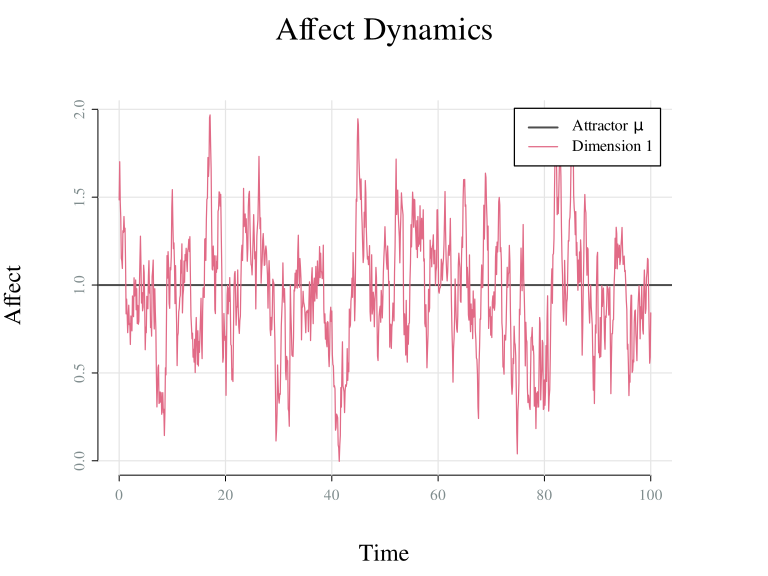
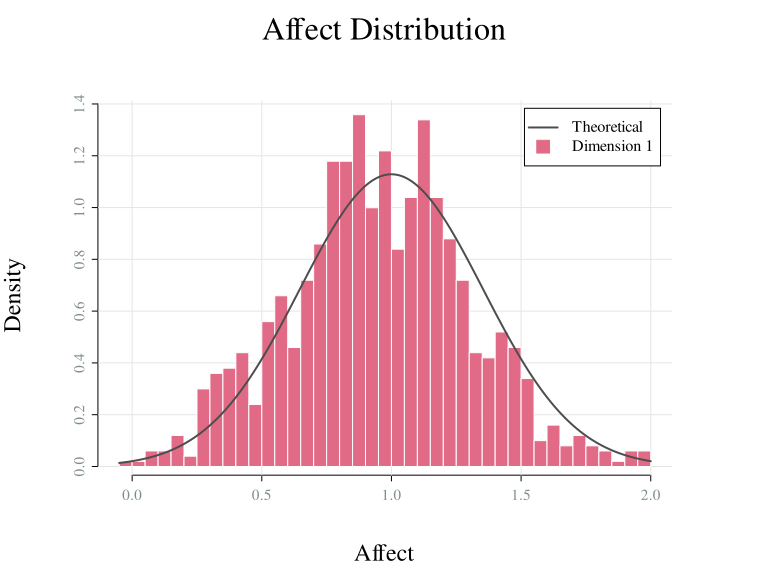
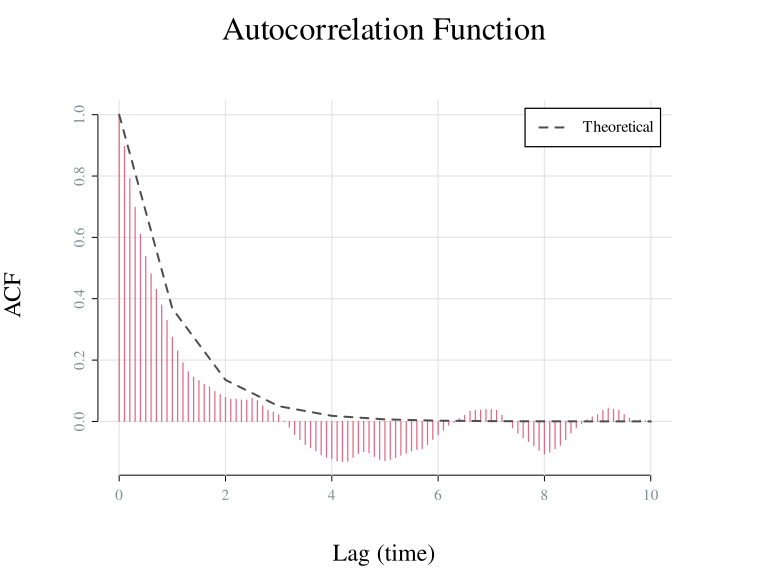
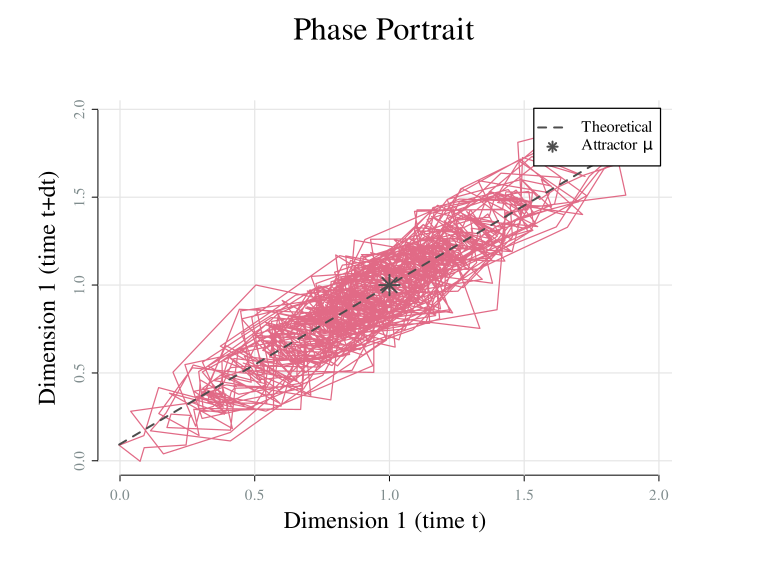
Time series trajectory (
type = "time",ou_plot_time()): Shows the simulated values of affect over time, along with a horizontal line denoting the baseline affective state \(\mu\).Distribution of affect values (
type = "histogram",ou_plot_histogram()): Shows the distribution of simulated affect values aggregated across time, along with a vertical line denoting the baseline affective state \(\mu\).Autocorrelation function (
type = "acf",ou_plot_acf()): Shows the value of the autocorrelation between simulated values at particular lags apart, along with a dashed line denoting the theoretical autocorrelation function implied by the OU model.Phase portrait (
type = "phase",ou_plot_phase()): Shows how affect at time \(t\) relates to the value of affect at the next time point \(t + \Delta t\). The dashed line denotes the theoretical relationship between affect at time \(t\) and \(t + \Delta t\) implied by the OU model, which is a linear relationship with slope \(e^{-\mathbf{\Theta} \Delta t}\) and intercept \((1 - e^{-\mathbf{\Theta} \Delta t} \mathbf{\mu})\).
Multiple Dimensions
The multidimensional OU can be simulated and visualised in the same
way as before. Here, we set by_dim = TRUE to show each
dimension in a separate subplot:
# Create an affectOU model with two dimensions
model_2D <- affectOU(ndim = 2)

# Simulate timeseries
sim <- simulate(
  model_2D
)

# Plot
plot(sim, by_dim = TRUE)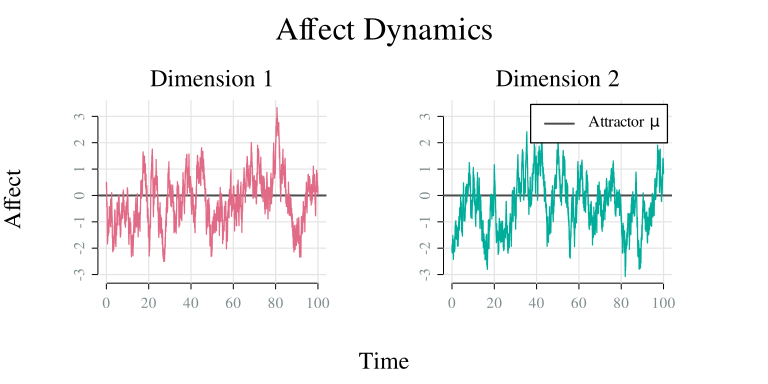
Multiple Simulations
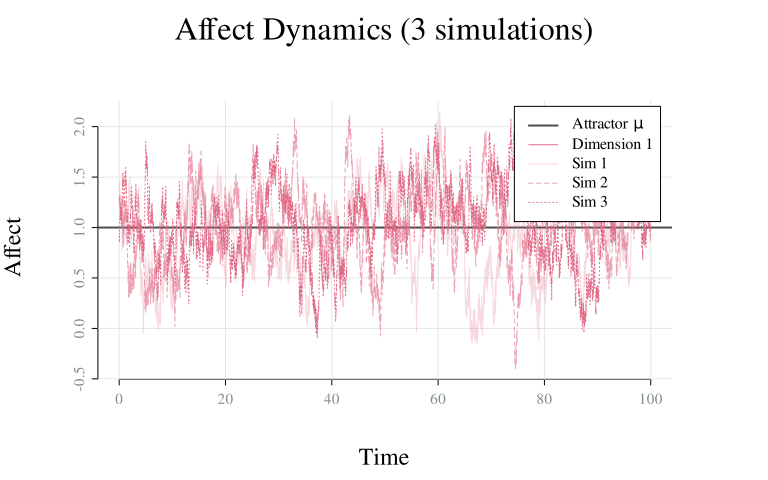
Multiple independent realizations of the model can be generated by
setting nsim > 1. This showcases the variability in
trajectories that arises from the stochastic nature of the OU process.
For example, the following code generates three independent simulations
from the same model:
Extracting Simulation Data
Simulated data can be extracted in different formats:
# Directly from the simulation object
data <- sim$data # 3D array (time × dimension × simulation)
# Using head() or tail()
head(sim, n = 3)
#>   time dim sim    value
#> 1 0.00   1   1 1.364023
#> 2 0.01   1   1 1.425661
#> 3 0.02   1   1 1.383119
# As a list of data frames (one per simulation)
sim_list <- as.list(sim)
head(sim_list[[1]], n = 3)
#>   time     dim1
#> 1 0.00 1.364023
#> 2 0.01 1.425661
#> 3 0.02 1.383119
# As a data frame (long or wide format)
sim_df <- as.data.frame(sim)
head(sim_df, n = 3)
#>   time dim sim    value
#> 1 0.00   1   1 1.364023
#> 2 0.01   1   1 1.425661
#> 3 0.02 1 1 1.383119Theoretical Quantities
Model Summary
Key theoretical properties can be computed with summary(),
showing the stability of the system (i.e., its long-term behavior) and
the stationary distribution (i.e., long-run means and (co)variances)
implied by the model parameters:
summary(model)
#>
#> ── 1D Ornstein-Uhlenbeck Model ─────────────────────────────────────────────────
#>
#> ── Dynamics ──
#>
#> Stable (node)
#>
#> ── Stationary distribution ──
#>
#> Mean: 1
#> SD: 0.354
For multidimensional models, the model summary also includes coupling indicators:
summary(model_coupled)
#>
#> ── 2D Ornstein-Uhlenbeck Model ─────────────────────────────────────────────────
#>
#> ── Dynamics ──
#>
#> Stable (node)
#>
#> ── Stationary distribution ──
#>
#> Mean: [0, 1]
#> SD: [1.04, 1.052]
#>
#> ── Structure ──
#>
#> Coupling: Dim 1 → Dim 2 (+), Dim 2 → Dim 1 (+)
#> Noise: independent
More detail is provided by stability()
and stationary():
stability(model_coupled)
#>
#> ── Stability analysis of 2D Ornstein-Uhlenbeck Model ──
#>
#> Stable (node). Deviations from the attractor decay exponentially.
#>
#> Eigenvalues (all real):
#> • λ1: 0.573
#> • λ2: 0.227
stationary(model_coupled)
#>
#> ── Stationary distribution of 2D Ornstein-Uhlenbeck Model ──
#>
#> Mean: [0, 1]
#> SD: [1.04, 1.052]
#>
#> 95% intervals:
#> • Dim. 1: [-2.08, 2.08]
#> • Dim. 2: [-1.103, 3.103]
#>
#> Stationary correlations:
#>   • Dims 1 & 2: -0.374
Fitting Models to Data
fit()
estimates OU parameters from univariate time series using maximum
likelihood:
# Generate data from known parameters
true_model <- affectOU(theta = 0.5, mu = 0, sigma = 1)
sim <- simulate(true_model, dt = 0.01, stop = 500, save_at = 0.1)

# Extract the simulated data
data <- as.data.frame(sim)

# Fit the model
fitted <- fit(true_model, data = data$value, times = data$time)
fitted
#>
#> ── Fitted 1D Ornstein-Uhlenbeck Model ──────────────────────────────────────────
#> 5001 data points (dt ≈ 0.100)
#> θ = 0.542, μ = -0.032, γ = 1.009
#> Log-likelihood: -1247.447
#> RMSE: 0.311
# Residuals over time
plot(fitted, type = "residuals")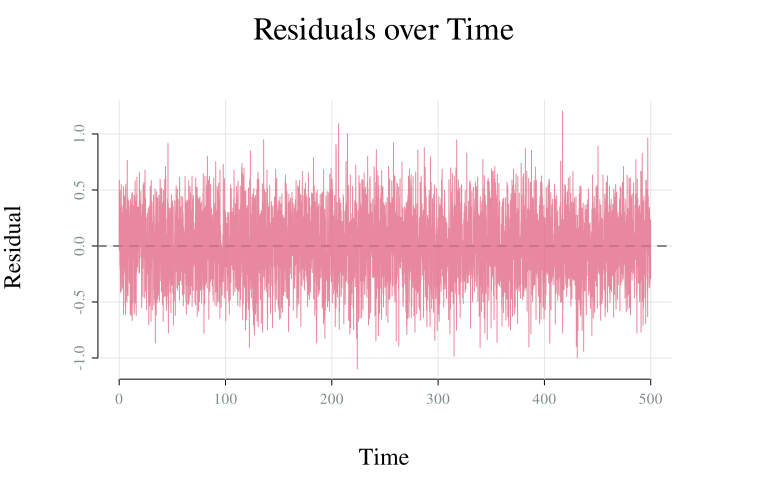
See plot() for
more details on available diagnostics and their interpretations.
Extract Equation
To ease the process of writing down the OU’s stochastic differential
equation, affectOU includes an equation()
function which renders the model’s equation in multiple formats,
offering plain text, LaTeX, R expression, or code output.
equation(model)
#> dX(t) = theta * (mu - X(t)) dt + gamma dW(t)
#>
#> where:
#>   theta = 1
#>   mu    = 1
#>   gamma = 0.5
#>   sigma = 0.25

equation(model, type = "latex")
#> \begin{equation*}
#> dX(t) = \theta \left( \mu - X(t) \right) dt + \gamma \, dW(t)
#> \end{equation*}
#>
#> where:
#> \begin{align*}
#>   \theta &= 1 \\
#>   \mu &= 1 \\
#>   \gamma &= 0.5 \\
#>   \sigma &= 0.25
#> \end{align*}
By default, this function will output the general equation and define
the parameter values below. The parameter values can also directly be
included in the equation by setting inline = TRUE:
equation(model, inline = TRUE)
#> dX(t) = 1 * (1 - X(t)) dt + 0.5 dW(t)
Summary
The typical workflow starts with the specification of an OU model of
the affectOU()
class, optionally adjusting its parameters via its arguments or through
the update()
method. Model trajectories can be generated with simulate()
and visualized with plot().
The model may be further understood by inspecting its theoretical
properties, for which the package offers summary(), stability(),
and stationary().
Finally, the OU can be fitted to empirical data through the fit() method, and
the resulting equation can be extracted with equation().