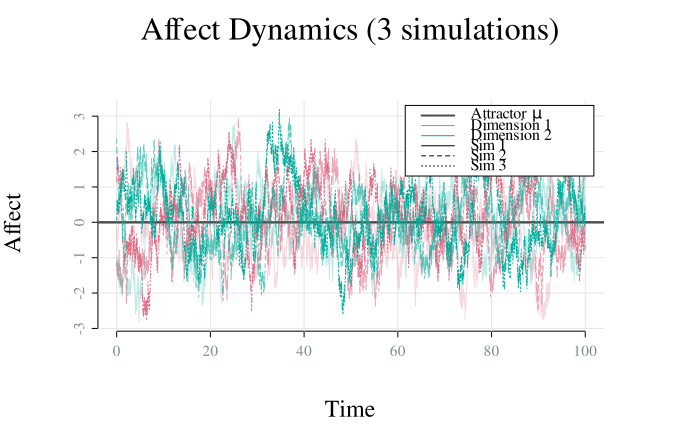
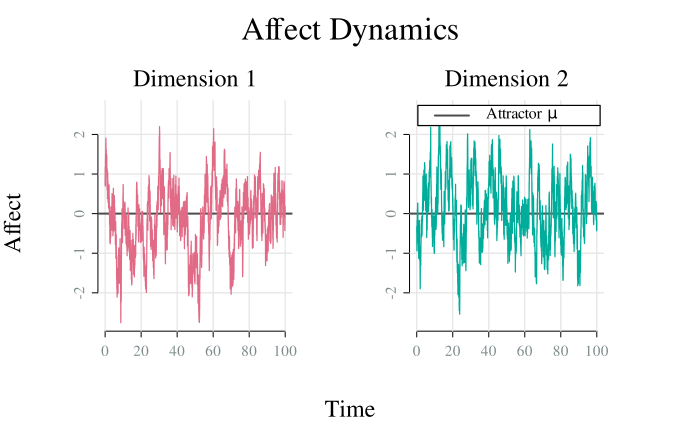
Visualise the time series trajectories of affect dimensions from an OU
affect simulation. Each dimension can be plotted in a separate panel by
setting by_dim = TRUE. Specific dimensions or simulations can be plotted
with which_dim and which_sim, respectively.
Usage
ou_plot_time(
  x,
  which_dim = NULL,
  which_sim = NULL,
  by_dim = FALSE,
  palette = "Dark 3",
  col_theory = "grey30",
  alpha = 1,
  lwd = ifelse(x[["nsim"]] > 1, 1, 1.25),
  share_yaxis = TRUE,
  main = paste0("Affect Dynamics", if (x[["nsim"]] > 1) {
     paste0(" (", if
    (is.null(which_sim)) {
x[["nsim"]]
     }
     else {

    length(which_sim)
     }, " simulations)")
 }),
  sub = paste("Dimension", if (is.null(which_dim)) {

    seq.int(x[["model"]][["ndim"]])
 } else {
     which_dim
 }),
  xlab = "Time",
  ylab = "Affect",
  legend_position = "topright",
  ...
)
Arguments
- x
A
simulate_affectOUmodel object produced bysimulate.affectOU()- which_dim
Dimension indices to plot (NULL for all)
- which_sim
Simulation indices to plot (NULL for all)
- by_dim
Logical; plot each dimension in separate panel?
- palette
Color palette. Should be one of
grDevices::hcl.pals().- col_theory
Color for
mu(i.e., attractor) line- alpha
Alpha transparency for colors (0 = transparent, 1 = opaque)
- lwd
Line width
Logical; use same y-axis limits for all panels?
- main
Main title
- sub
Subtitle for panels
- xlab
X-axis label
- ylab
Y-axis label
- legend_position
Position of legend (one of
"bottomright","bottom","bottomleft","left","topleft","top","topright","right","center","none"). Set to"none"to hide legend.- ...
Additional graphical parameters